jun 16, 2026 · 10 min read
Building a WhatsApp Service for a Multi-Tenant CRM
A WhatsApp Cloud API integration for a fitness CRM: tenant onboarding, credential boundaries, queued sends, and delivery analytics.
A client's CRM had leads for gyms and studios, but no way to message them on WhatsApp. Every tenant had to export a list, open another tool, and paste numbers into it. They wanted to do it inside the product they were already using.
So we built a WhatsApp service behind the CRM. Each tenant connected its own account through Meta's Embedded Signup. The CRM kept its own UI and auth, and called our backend when it needed to send something.
We used NestJS, PostgreSQL, and RabbitMQ. Sending the API request was only a small part of the work. There was also onboarding to finish, credentials to keep separate, and delivery events to match back to the right campaign.
This is how we put it together. If you're setting up a new Meta app, keep the Cloud API and Embedded Signup docs open too. The dashboard and onboarding requirements change.
Why we split it into two services

The WhatsApp API Service sits behind the CRM backend. It has the tenant tokens and can send messages or manage their WhatsApp accounts. There's no public route to it.
Meta still needs somewhere to deliver webhooks, so we gave that a separate service. The Webhook Service accepts callbacks, verifies them, and puts the events on a queue. It has no tenant access tokens or endpoints for sending messages.
It does need the App Secret to check webhook signatures. So there's still a secret on the public side, but receiving a webhook doesn't require access to every tenant's sending credentials.
The IDs you keep running into
Meta has a few different IDs for things that sound fairly similar. These are the ones we needed:
- The App ID identifies your Meta app. The browser uses it to launch signup.
- The App Secret stays on the server. It's used for code exchange and webhook verification.
- The Configuration ID, or
config_id, selects the Facebook Login for Business configuration, including the signup flow and permissions it asks for. - The WABA ID, or
waba_id, identifies a WhatsApp Business Account. That's where the phone numbers and templates belong. - The phone number ID, or
phone_number_id, identifies the number you register and send from.
Embedded Signup also gives you a short-lived authorization code. Your backend exchanges that for a business integration System User access token, which lets the service act for the connected business. You can't send messages with the code itself.
The number still needs registration for the Cloud API, including a two-step verification PIN. Templates need Meta's approval, and webhooks tell you when messages are delivered, read, or replied to.
Getting the Meta setup out of the way
Business verification and app review
Our app belonged to the business providing the integration. That business needed verification, and the app needed approval for its permissions before production onboarding. Tenants go through their own checks when they connect.
I'd start the reviews early. A flow working for an account with an app role doesn't mean it'll work for an outside customer. The business verification guide and Embedded Signup requirements cover those checks.
App credentials and signup configuration
We created the business app in the Meta App Dashboard and set up WhatsApp and Facebook Login for Business. The frontend got the App ID. The App Secret stayed on the servers that needed it.
The login configuration gave us the config_id. We needed two WhatsApp permissions:
whatsapp_business_management, for operations on WABA settings and templates.whatsapp_business_messaging, for messaging and related phone-number operations.
Selecting them in the configuration wasn't enough; the app needed the appropriate access approval too. Meta's permissions reference has the requirements for each one.
Give the signup page an HTTPS URL
We used a public HTTPS page to launch signup, with its domain and OAuth settings registered in the Meta app. That kept local-origin and redirect mismatches out of the way while testing.
If you have a staging deployment, use that. For a local frontend, something like ngrok gives you a public URL:
# expose your local front-end (running on port 3000) over public HTTPS
ngrok http 3000
# ngrok prints a URL like https://a1b2c3d4.ngrok-free.app
Add the URL to the app settings, and update it when the tunnel URL changes. The webhook endpoint needs a public HTTPS address too, since Meta has to reach it.
Leaving auth to the CRM
The CRM already knew who its users were, which tenant they belonged to, and whether they could start a campaign. We didn't need to build that again. The frontend called the CRM backend, the backend checked the action, and only then did it call our service.
We supplied the endpoints, and the client added them to its own UI and feature flags. A different product could plug in the same way without taking on another user system.
That leaves an assumption you have to enforce: the caller really is the CRM backend. An internal IP alone isn't proof of that. Use network rules and, where appropriate, mutual TLS or signed service credentials. If someone gives this service a public route later, the auth model no longer holds.
Keeping tenants and connections separate
Their CRM used MongoDB and our service used PostgreSQL. We made a Business record for each tenant and kept the CRM tenant ID on it as a unique external reference. Postgres could enforce that uniqueness, but the relationship back to MongoDB had to be handled by the application.
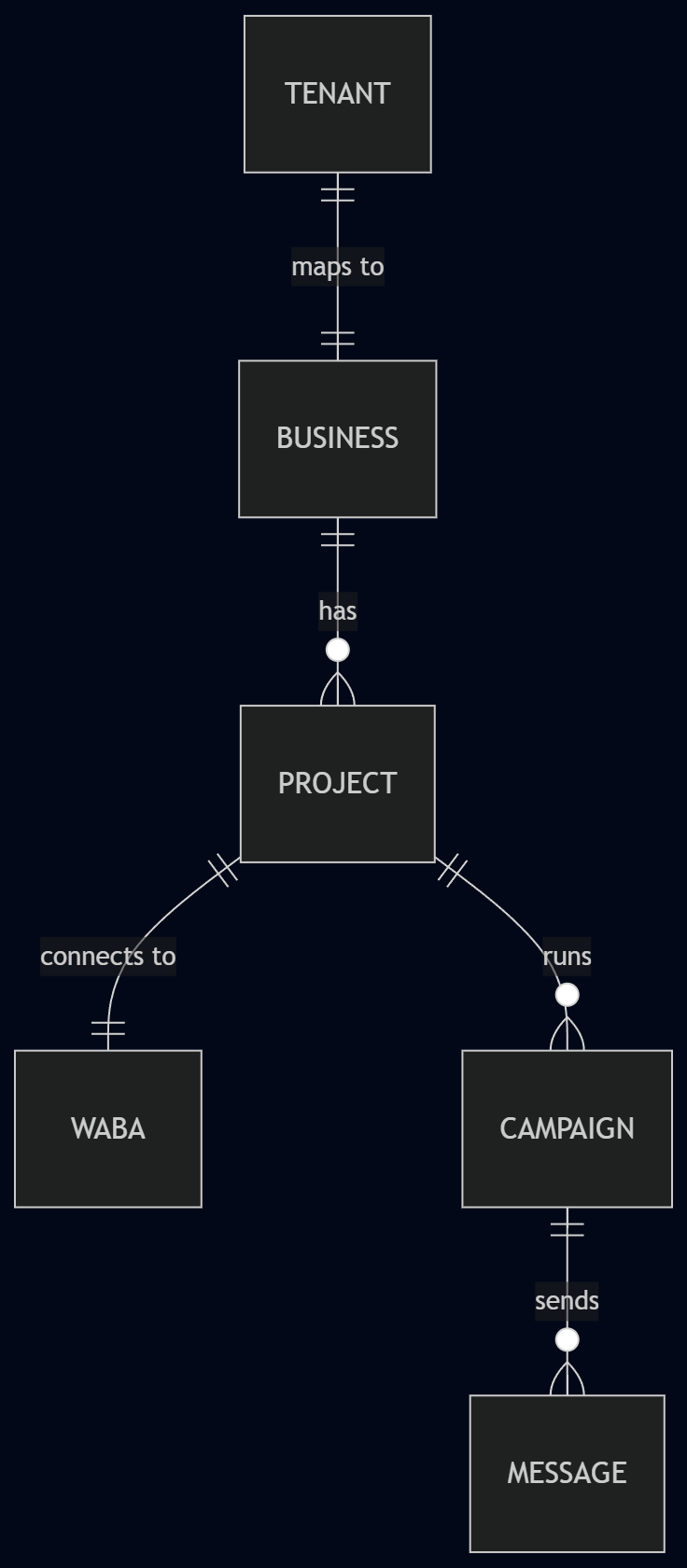
A tenant had one Business, and a Business could have several Projects. Each Project was one WhatsApp connection, with its waba_id, phone_number_id, token, and onboarding status. So a gym with several locations could connect separate numbers under the same tenant.
A shortened version of the schema:
CREATE TABLE businesses (
  id          UUID PRIMARY KEY DEFAULT gen_random_uuid(),
  tenant_id   TEXT NOT NULL UNIQUE,   -- FK back to the CRM's MongoDB tenant
  created_at  TIMESTAMPTZ NOT NULL DEFAULT now()
);

CREATE TABLE projects (
  id               UUID PRIMARY KEY DEFAULT gen_random_uuid(),
  business_id      UUID NOT NULL REFERENCES businesses(id),
  waba_id          TEXT,
  phone_number_id  TEXT,
  access_token     TEXT,              -- System User token, encrypted at rest
  status           TEXT NOT NULL DEFAULT 'pending', -- pending | active | failed
  created_at       TIMESTAMPTZ NOT NULL DEFAULT now()
);
The tenant_id comment is that application-level link back to the CRM. We store encrypted data in access_token. The other field that matters for sending is status: only an active Project can be picked for a campaign.
Connecting a tenant
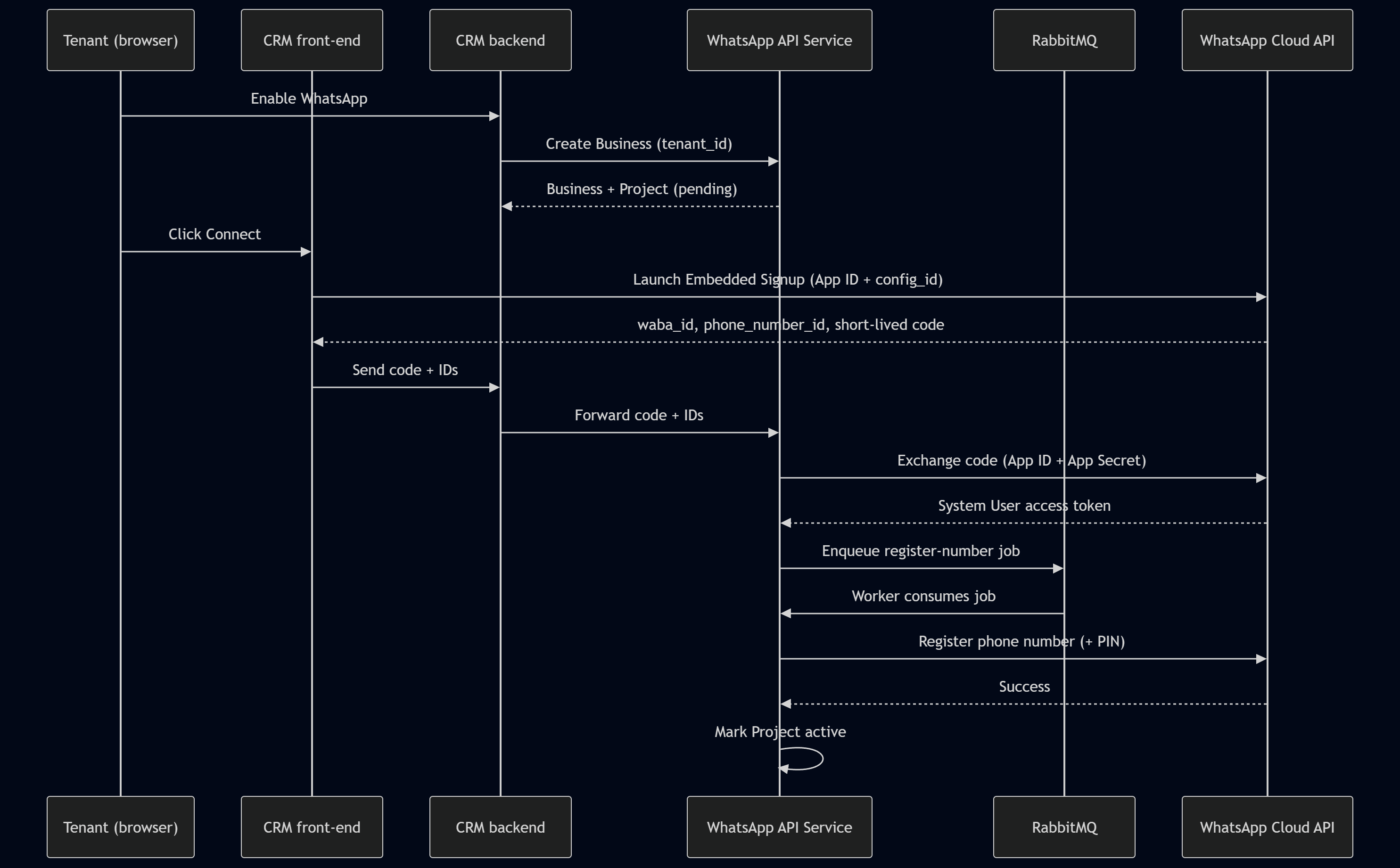
When a tenant enabled WhatsApp, we created its Business record and a pending Project. The CRM had already checked whether the tenant could do this, so there wasn't much left for the controller:
// Internal API Service. Only the CRM backend can reach this.
@Post('businesses')
async createBusiness(@Body() dto: CreateBusinessDto) {
  // The CRM backend has already authorized this tenant.
  return this.businessService.createForTenant(dto.tenantId);
}
The tenant then got a Connect button in the CRM. Clicking it launched signup with the App ID and configuration. The SDK call asks for an authorization code:
// Front-end, served from a public HTTPS origin (see the ngrok note above).
FB.login(callback, {
  config_id: '<YOUR_CONFIG_ID>',
  response_type: 'code',     // ask for the short-lived authorization code
  override_default_response_type: true,
});
They chose or created a WABA and went through Meta's setup on Meta's domain. Their Facebook password never went through our service.
There are two results to collect here. The login response has the authorization code, while Embedded Signup's session events have the WABA and phone-number IDs. The snippet above only opens the flow. The frontend still needs to handle those events, check their origin, and match the result to the pending connection.
The frontend sent it all to the CRM backend, which forwarded it to the API Service. We exchanged the code on the server because that needed the App Secret, and we did it promptly because the code was short-lived:
GET /oauth/access_token
  ?client_id={app-id}
  &client_secret={app-secret}
  &code={short-lived-code}
That path sits under the configured Graph API version. Once the exchange succeeded, we encrypted the token and saved it against the Project.
Keeping it pending until registration finishes
Registration was another network call that could be slow or fail for a while. So we put it on RabbitMQ:
// After a successful code exchange, hand off registration to the queue.
await this.queue.publish('whatsapp.register', {
  projectId: project.id,
  phoneNumberId: project.phoneNumberId,
  pin: generateSixDigitPin(),   // the two-step verification PIN
});
The worker registered the phone number and set its two-step verification PIN:
POST /{phone-number-id}/register
{
  "messaging_product": "whatsapp",
  "pin": "{six-digit-pin}"
}
Keep the PIN somewhere secure; you'll need it if the number gets re-registered. When registration succeeded, the worker marked the Project active. If it failed, the Project stayed inactive while the worker retried. That kept a half-connected number out of the sending flow.
Onboarding also subscribed the app to webhooks on the tenant's WABA. Otherwise, messages could go out without the delivery events making it back to the CRM.
Sending a campaign
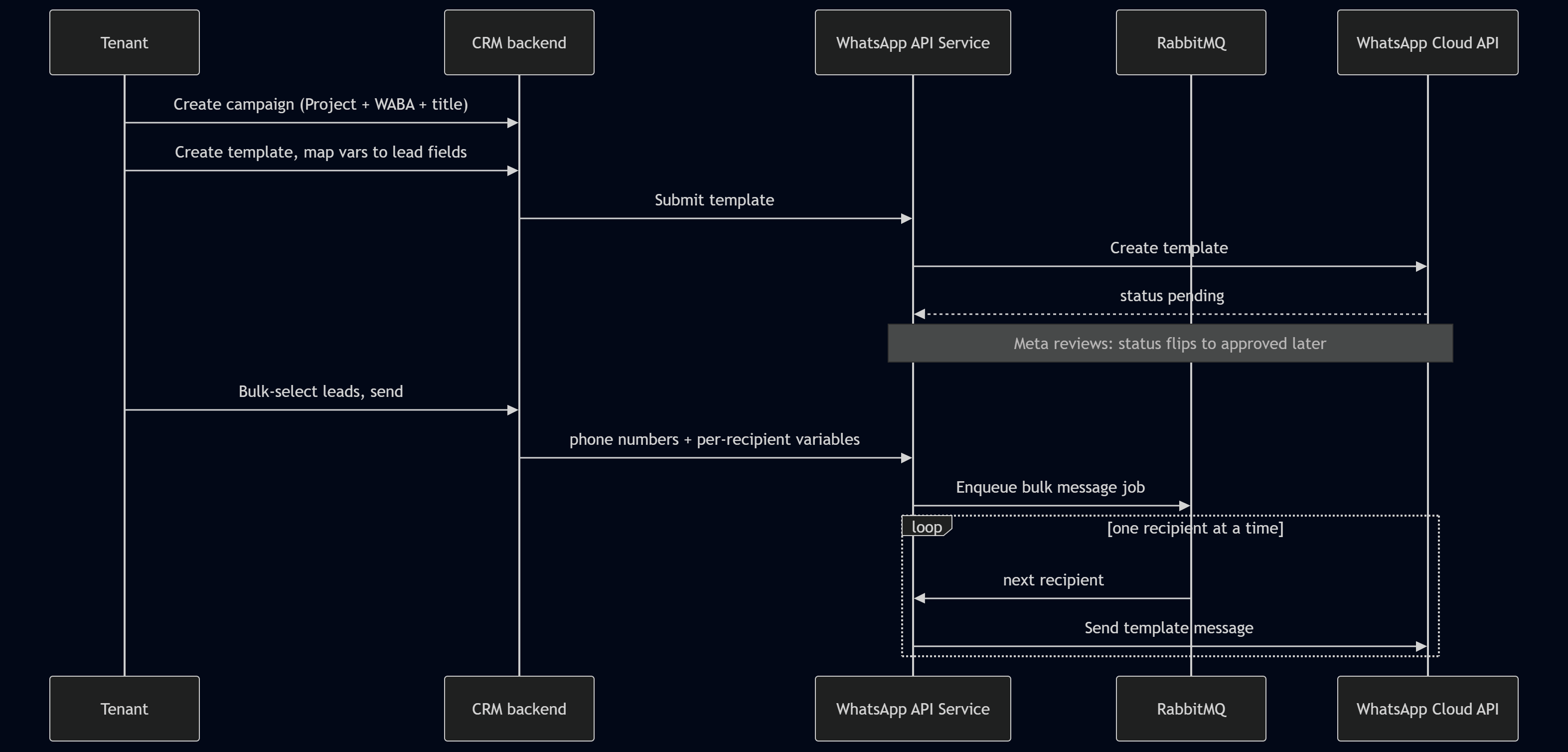
Picking the connection
A campaign kept the recipients, selected Project, and CRM metadata together. The CRM only offered active Projects when creating one, so the tenant couldn't choose a number that hadn't finished connecting.
Filling in the template
For business-initiated messages that needed an approved template, the tenant created one and mapped its variables to lead fields. Each mapping had a default too. If a lead had no first name, "there" could give you "Hi there" instead of an empty greeting.
We submitted the template to Meta and kept its review status. Until Meta approved it, it stayed pending. A trimmed creation payload looked like this:
{
  "name": "lead_welcome",
  "language": "en_US",
  "category": "MARKETING",
  "components": [
    { "type": "BODY", "text": "Hi {{1}}, welcome to {{2}}!" }
  ]
}
Our service kept a reference to the stored template. The Cloud API adapter turned it into Meta's send format, with the name, language, and populated components. So templateId in the worker example is our service's identifier; it's not the whole Cloud API payload.
Letting the worker send it
The tenant selected leads in the CRM, which filled the template variables, applied the defaults, and sent us the phone numbers and values for each recipient.
We put the bulk send on RabbitMQ. The worker started with this sort of loop:
@MessagePattern('whatsapp.bulk-send')
async handleBulkSend(@Payload() job: BulkSendJob) {
  for (const recipient of job.recipients) {
    await this.whatsapp.sendTemplate({
      phoneNumberId: job.phoneNumberId,
      to: recipient.phone,
      templateId: job.templateId,
      variables: recipient.variables,   // already filled by the CRM
    });
    // one at a time: respects rate limits, isolates failures
  }
}
The comment there is doing a bit too much. await makes the sends sequential, but it doesn't set a requests-per-second limit. And if one recipient throws an error that isn't caught, the loop stops.
The full worker needs pacing, an outcome for each recipient, and a way to retry failed recipients without sending again to the ones who already got their message. It also has to separate temporary failures from errors that won't improve with a retry. If several workers share a provider limit, they need shared state for that too. I wrote more about it in the outbound rate-limiting post.
RabbitMQ gives the backlog somewhere to wait outside the HTTP request. Rate limiting, failure isolation, and duplicate sends still need handling.
Finding out what happened to the message
An accepted send wasn't enough for the CRM. The gym also needed to know whether it arrived and whether the lead replied. Those events came back through the public Webhook Service.
Before trusting an event, the receiver checked X-Hub-Signature-256. That's an HMAC SHA-256 of the raw request body using the App Secret. The comparison itself looked like this:
// Public Webhook Service: verify the signature before trusting anything.
verifySignature(rawBody: Buffer, header: string): boolean {
  const expected =
    'sha256=' +
    createHmac('sha256', APP_SECRET).update(rawBody).digest('hex');
  return timingSafeEqual(Buffer.from(expected), Buffer.from(header));
}
Around that comparison, reject missing or malformed headers and check the buffer lengths. timingSafeEqual throws if they're different. You also need the raw body before JSON parsing. Turning the parsed object back into JSON can change the bytes and break the signature check.
Once verified, the events went on the queue and got matched to their stored sends, recipients, Projects, and campaigns. The CRM could then show delivery, read, failure, and reply counts for each tenant.
Those events can arrive more than once or out of order. A valid signature tells you where the payload came from; you still have to account for repeated events and older status updates.
Where we ended up
The tenant could now connect a WhatsApp account, send a campaign to leads already in the CRM, and see what happened to those messages. No exporting a list to another tool, and the client kept its own UI and permissions.
We still had the internal API, public webhook receiver, and workers to run. The queue kept slow calls out of the request, and the stored connection and recipient states gave the CRM something useful to show while the work was happening.